

01
Line-itemed and customer-trackable
Build invoices in the dashboard or via API - line items, quantities, discounts, taxes, due dates. Each invoice has a unique hosted payment page and a status you can track.
Checkout / Invoice
ZevPay Invoice generates a fully-billable invoice with line items, customer details, due date, and a hosted payment URL. Share the link by WhatsApp, email, or paste - customer pays, you get a webhook.
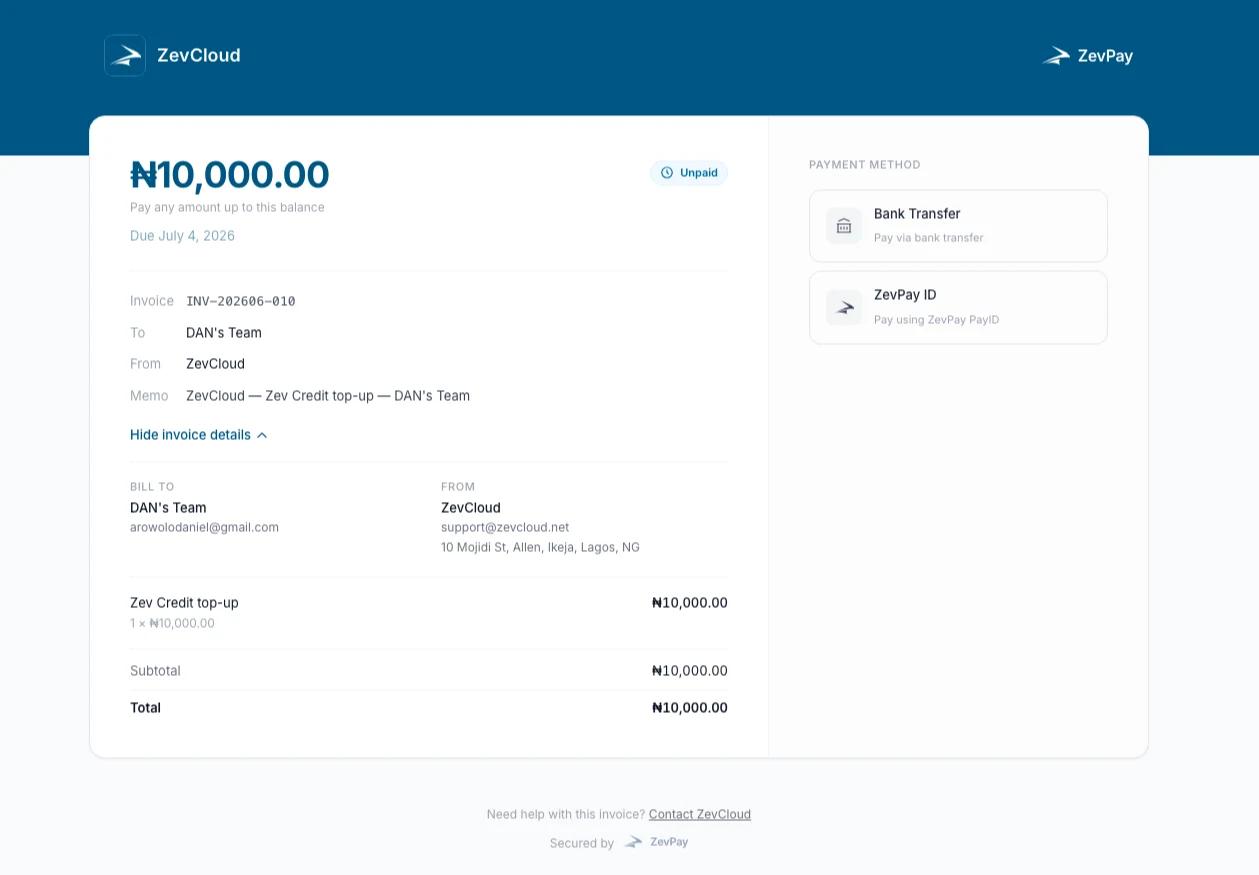
Build invoices in the dashboard or via API - line items, quantities, discounts, taxes, due dates. Each invoice has a unique hosted payment page and a status you can track.
The invoice URL works in WhatsApp, SMS, email, in-person QR codes, or pasted into chat. No app required for the customer - they tap the link, pick a payment method, pay.
Non-technical teams can issue invoices from the dashboard without involving engineering. Reconciliation matches against the invoice number automatically.
Your backend gets the standard signed webhook the moment the invoice is paid - same shape as Inline and Standard, so your handler covers all three.
In code
The full happy path is short. You can swap real keys in and ship to staging today.
Full Invoice reference# create a billable invoice with line items
curl https://api.zevpaycheckout.com/v1/invoices \
-H "Authorization: Bearer sk_live_…" \
-d '{
"customer": { "email": "ada@acme.ng", "name": "Adaeze Okonkwo" },
"due_date": "2026-07-14",
"line_items": [
{ "name": "Custom embroidery", "qty": 2, "amount": 1250000 },
{ "name": "Express delivery", "qty": 1, "amount": 350000 }
]
}'
# → { "url": "https://invoice.zevpaycheckout.com/inv_a1b2…" }
# share the URL via WhatsApp / email / SMS - customer pays + you get a webhookHow it works
Create it in the dashboard or via POST /v1/invoices with line items + customer.
Send the hosted payment URL via WhatsApp, email, SMS, or a printed QR code.
Same signed webhook shape as Inline + Standard - one handler covers all three.
Perfect for
Bill clients with line items, due dates, and payment terms - no Excel.
Send the link, the buyer pays at their convenience. Receipts auto-issued.
Issue school fees, donations, and contribution invoices in bulk.
Ticketing without a separate platform - invoice each guest individually.
Payment methods
Whether you call us via Invoice or one of the other two - your customer sees the same checkout surface and the same payment options. One KYC posture across all.
Debit / Credit Card
Visa, Mastercard, Verve
Bank Transfer
Dynamic NUBAN per checkout
ZevPay ID
Pay from any ZevPay account
ZevPay QR
Scan with the ZevPay app
Common questions
Yes - set a reminder schedule per invoice. We send via email or SMS on your behalf based on the due date.
Yes - upload a CSV in the dashboard or POST /v1/invoices/batch from your backend.
Logo, colors, and footer note are all configurable - set defaults globally or override per invoice.
Same four methods as Inline and Standard - Card, Bank Transfer, ZevPay ID, and ZevPay QR.
Invoice integration
Add Invoice to your existing stack with the same pk_ key you already use.