

01
One script tag, any stack
Add `<script src="https://js.zevpaycheckout.com/v1/inline.js"></script>` and you're done. The SDK exposes a typed JS API for opening checkouts on click; works in React, Vue, Svelte, plain HTML, and CMS themes.
Checkout / Inline
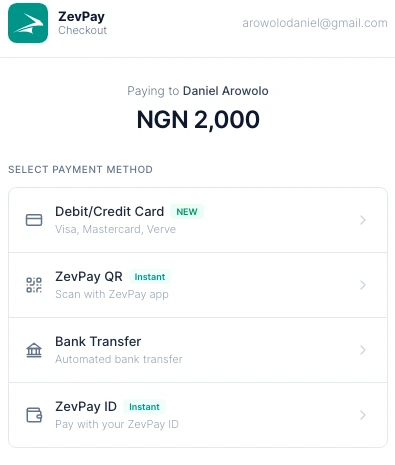
ZevPay Inline drops a script tag into any site and opens the checkout in a modal over your page. No redirect, no leaving your domain. Same shape whether your stack is React, Vue, vanilla, PHP, or a Shopify theme.
Add `<script src="https://js.zevpaycheckout.com/v1/inline.js"></script>` and you're done. The SDK exposes a typed JS API for opening checkouts on click; works in React, Vue, Svelte, plain HTML, and CMS themes.
The checkout opens as a modal over your existing page. Customers never leave your site to pay - better conversion, fewer drop-offs at the redirect step.
Pass an onSuccess handler and we'll hand you the reference the instant the payment confirms. Verify with the matching webhook on your backend.
Card, bank transfer, and PayID all show up inside the same modal. You decide which to enable per checkout via the paymentMethods array.
In code
The full happy path is short. You can swap real keys in and ship to staging today.
Full Inline reference<!-- 1. drop the SDK into any page -->
<script src="https://js.zevpaycheckout.com/v1/inline.js"></script>
<!-- 2. open the checkout when the user clicks -->
<script>
const zp = new ZevPay.ZevPayCheckout();
document.getElementById('pay').onclick = () =>
zp.checkout({
apiKey: 'pk_live_…',
email: 'customer@acme.ng',
amount: 250000, // ₦2,500 in kobo
onSuccess: (ref) => fetch('/api/confirm/' + ref),
onClose: () => console.log('checkout closed'),
});
</script>How it works
Add one <script> tag to any page. The SDK auto-mounts on window.ZevPay.
Call zp.checkout({...}) on click - the modal slides over your page.
Your onSuccess handler fires the moment the payment confirms. Webhook fires too.
Perfect for
Framework-agnostic. Mount the SDK once, call from any component.
Custom storefront, no rebuilds - checkout is just an API call.
Pre-fill amounts and emails from your cart, surveys, or donation flows.
Trigger checkout from any item card without leaving the listing.
Payment methods
Whether you call us via Inline or one of the other two - your customer sees the same checkout surface and the same payment options. One KYC posture across all.
Debit / Credit Card
Visa, Mastercard, Verve
Bank Transfer
Dynamic NUBAN per checkout
ZevPay ID
Pay from any ZevPay account
ZevPay QR
Scan with the ZevPay app
Common questions
Yes - the SDK is framework-agnostic. Drop the script once, call the JS API from any framework or vanilla JS.
Yes - pass a theme option with your brand colors when initializing, or set defaults in your dashboard.
Yes - the modal is responsive and renders full-screen on small viewports, with native keyboard handling for card forms.
Your onClose callback fires. The transaction reference stays valid - you can show a 'try again' CTA or recover the abandoned session.
Inline integration
Add Inline to your existing stack with the same pk_ key you already use.